
GitHub Local Actions


Run your GitHub Actions locally with the power of the GitHub Local Actions VSCode extension! Say goodbye to the hassle of committing and pushing changes every time you need to test a workflow. This extension lets you quickly and efficiently run your workflows locally, leveraging the nektos/act CLI tool. Enjoy a seamless experience with an interface designed to feel as familiar as the official GitHub Actions extension.
- 🚀 Run Workflows/Jobs: Run entire workflows or specific jobs locally without leaving your editor.
- ⚡ Trigger Events: Trigger standard GitHub events to run multiple workflows.
- 📖 View Workflow Run History: Track and investigate past workflow logs.
- ⚙️ Manage Workflow Settings: Define secrets, variables, inputs, and runners to be used when executing workflows.
Components
The Components view is where you can manage the components which must be installed and started up before running any GitHub Actions.
-
nektos/act: Act is a CLI tool responsible for executing your workflows locally. It can be installed via several software package managers or using a pre-built artifact.
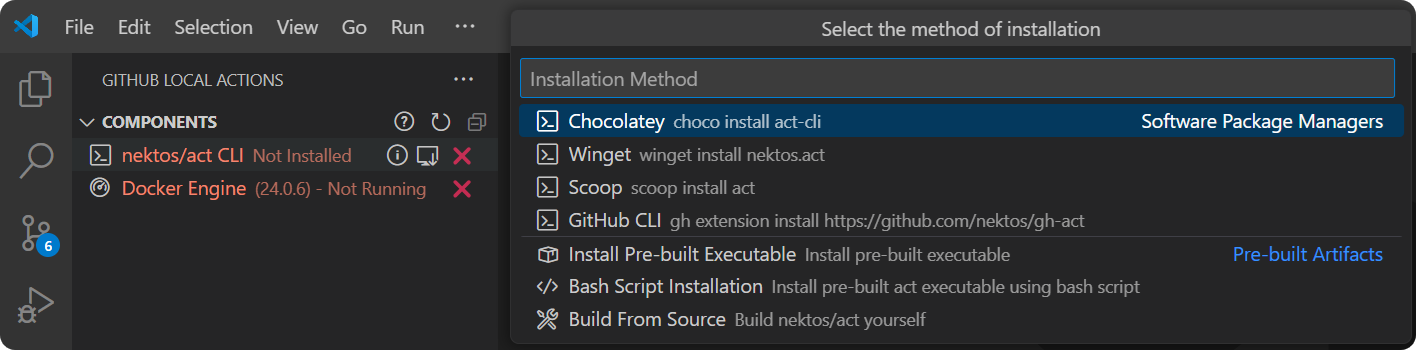
-
Docker Engine: Docker Engine is required for act to function as it uses Docker to handle workflow execution. The process includes:
- Pulling or building the images specified in your workflow files
- Determining the execution path based on your workflow's dependencies
- Running containers for each action using the prepared images
The containers are configured to mirror GitHub's environment, including matching environment variables and filesystems, ensuring a consistent and reliable local execution.

Workflows
The Workflows view is where you can manage and run workflows locally. You have several options to execute a workflow:
- Run All Workflows: Run all workflows in the workspace.
- Run Workflow: Run an entire workflow.
- Run Job: Run a specific job in a workflow.
- Run Event: Run multiple workflows by triggering a GitHub event.

History
Settings
Bugs and Feature Requests
Feel free to share any bugs or feature requests in the project's GitHub Issues page.
Contribution
Contributions are always welcome! Please see our contributing guide for more details.